
Retargeting Campaigns
Build a campaign that exclusively targets people who have already visited your site.
Last updated September 1, 2026
Watch
Create a Retargeting Campaign
Build a campaign that exclusively targets people who have already visited your site.
How Retargeting Differs from Prospecting
A prospecting campaign targets new users who have never engaged with your brand. A retargeting campaign exclusively re-engages past visitors — people who landed on your site (tracked by the retargeting pixel) but did not convert. Because this audience already knows your brand, retargeting campaigns typically deliver significantly higher conversion rates than prospecting campaigns.
Prerequisites
Before creating a retargeting campaign, you must have a retargeting pixel installed on your site and enough site traffic to build a meaningful audience. Topple requires a minimum audience size before a retargeting campaign can begin delivering. If your audience is too small, the campaign will show limited or no delivery.
How to Create a Retargeting Campaign
- 1Start a new campaign.
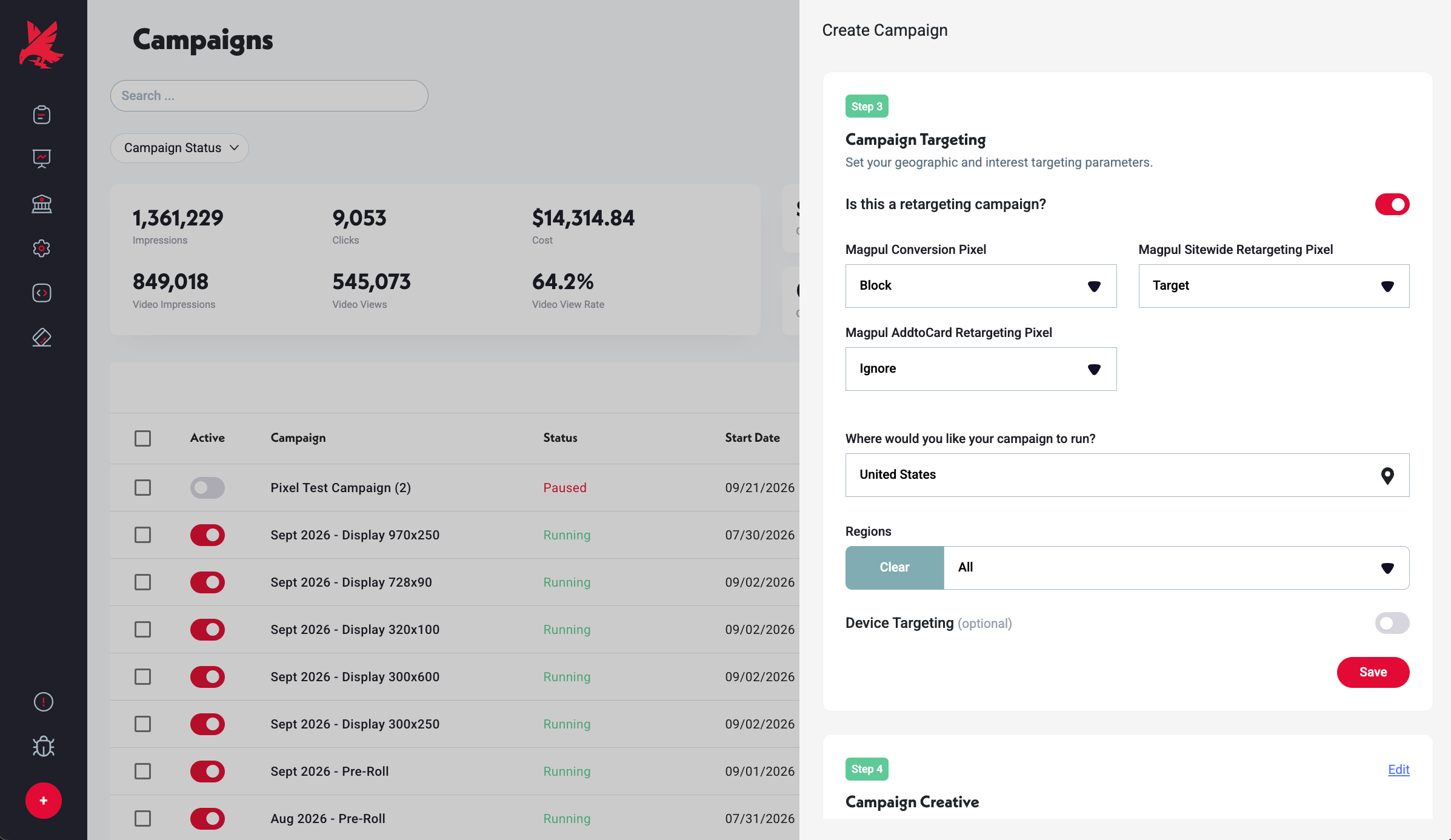
- 2In the Targeting step, toggle on 'Is this a retargeting campaign?'.
- 3Each pixel in your account appears with three controls: Target (serve ads to this pixel's audience), Block (exclude this audience), or Ignore (no action for this pixel).
- 4Set Target for the retargeting pixel whose audience you want to reach.
- 5Set the rest of your targeting, creative, and budget parameters.
- 6Launch the campaign.
Common Mistakes
- 1Launching a retargeting campaign before the audience has had time to build — if the retargeting pixel was just installed, the audience will be too small to deliver against. Allow at least several days of normal site traffic to accumulate before expecting meaningful delivery from a retargeting campaign.
- 2Selecting the wrong pixel — if you have multiple pixels in your account (e.g., a retargeting pixel and a conversion pixel), confirm you are selecting the retargeting pixel (the one installed site-wide) rather than the conversion pixel (installed only on the thank-you page). The conversion pixel's audience is just purchasers, not the broader visitor pool you want to retarget.
- 3Not enabling Blocking Converted Users — if you do not block converted users, your retargeting campaign will continue showing ads to people who already purchased, wasting budget on an audience that has already converted. Set up blocking converted users to keep your retargeting spend focused on non-converters.
Retargeting Audience Not Building?
If your retargeting campaign is showing no delivery due to audience size, see the troubleshooting guide.
Read: Why isn't my retargeting audience building? — /troubleshooting/why-isnt-my-retargeting-audience-building
Was this helpful?