
Budget, Pacing & Bidding
How Total Budget, Daily Budget, Pacing, Maximum CPM, and Frequency Cap work together to control your spend.
Last updated September 1, 2026
Total Budget
Total Budget is an optional hard cap on how much a campaign can spend over its entire lifetime. When this cap is reached, the campaign pauses automatically. If you are running an open-ended campaign with no end date, setting a Total Budget is the only automatic stop — when it is reached, the campaign stops until you increase the cap or restart it manually.
Do not set a Total Budget on an open-ended campaign unless you intend it to pause automatically after a specific spend. Without an end date, the only automatic stop is the Total Budget cap.
Maximum Daily Budget
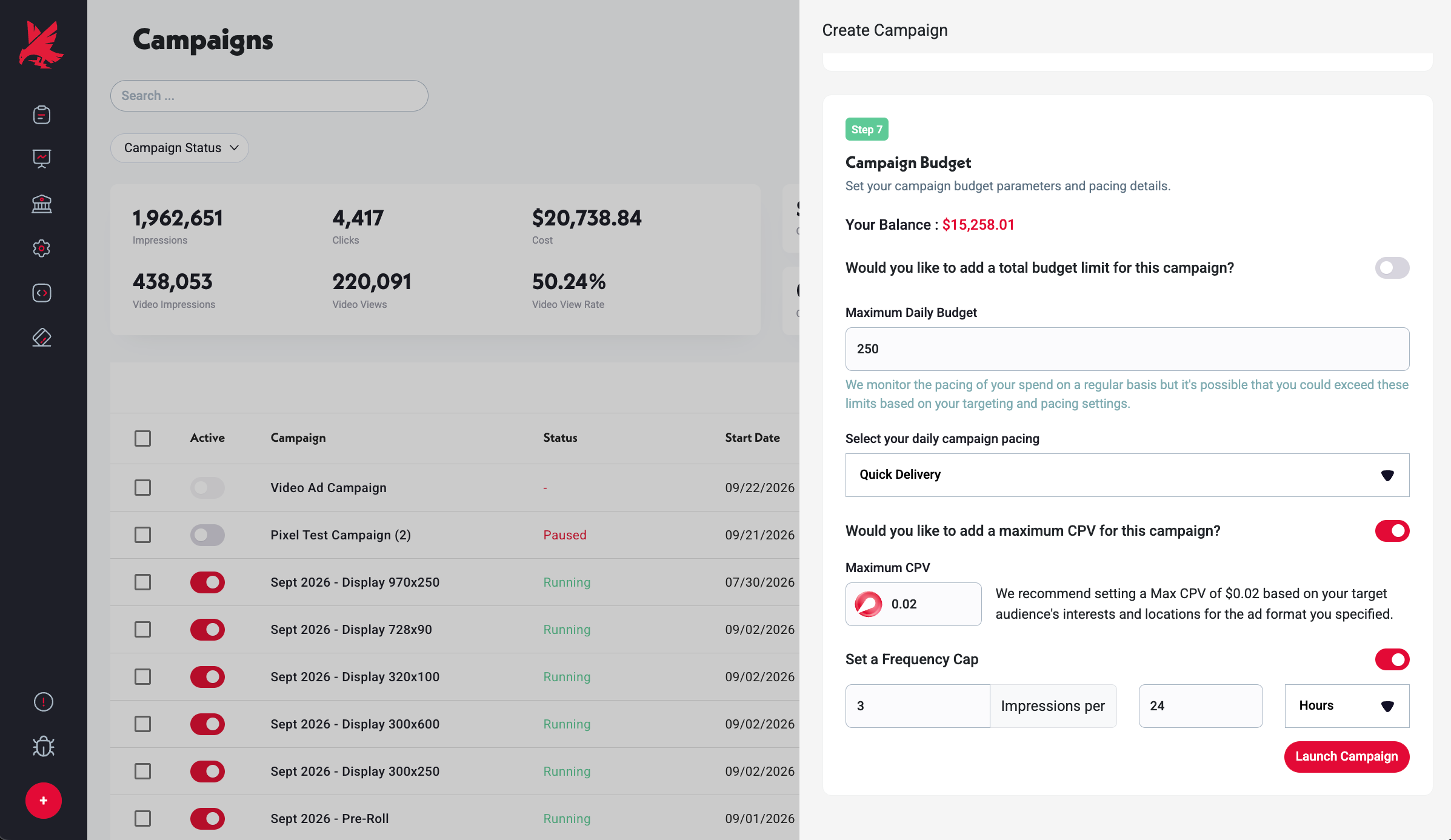
Maximum Daily Budget is the most the campaign can spend in a single day. On high-demand days, Topple may exceed this limit by up to 20% — this is normal and ensures you capture delivery opportunities. The 20% overage is factored into the campaign's accounting over time.
Campaign Pacing
Pacing controls how the daily budget is distributed throughout the day. Fast pacing spends the daily budget as quickly as possible — good for time-sensitive campaigns or when you want maximum delivery early in the day. Even pacing spreads the budget across the day to maintain consistent presence from morning to evening.
Maximum CPM
Maximum CPM is your bid ceiling — the most you are willing to pay per thousand impressions. Topple participates in real-time auctions on your behalf. If your Maximum CPM is set too low relative to market demand for your target audience, your campaign will under-deliver or fail to serve at all. If a campaign is winning few auctions, try incrementally raising the Maximum CPM.
Frequency Cap
Frequency Cap optionally limits how many times a single user sees your ads within a given time window (e.g., no more than 3 times per day). This prevents ad fatigue — showing the same person your ad too many times tends to decrease engagement and increase negative sentiment. For retargeting campaigns especially, frequency caps help you stay visible without becoming annoying.
Common Mistakes
- 1Confusing Even pacing with lifetime spreading — Even pacing distributes your daily budget evenly across the hours of each day, not across the campaign's entire lifetime. If your campaign has a large Total Budget and a modest Daily Budget, Even pacing does not mean the total spend is metered out smoothly over weeks. It means each individual day's allotment is spread across that day's hours. Set the Daily Budget to control how much is spent each day.
- 2Setting Maximum CPM based on a competitor's stated rate rather than your own delivery data — CPM pricing varies by audience, placement, and demand. A CPM that is too low for your specific targeting combination will result in under-delivery regardless of what rates competitors report. Use your own campaign's impression win-rate data to calibrate — if wins are low, increase gradually until delivery normalizes.
- 3Leaving Frequency Cap unset on retargeting campaigns — without a frequency cap, the same user can see your retargeting ad many times in a single day, which drives up spend without increasing conversion likelihood and risks damaging brand perception. Set a conservative cap (e.g., 3–5 per day) on retargeting campaigns.
Was this helpful?