
Copying Campaigns
Duplicate an existing campaign to test a variation or relaunch a past campaign without rebuilding from scratch.
Last updated September 1, 2026
Watch
Copy Ad Campaigns
Learn how to duplicate an existing campaign to test a variation or relaunch a past campaign without starting from scratch.
When to Copy a Campaign
Copying is useful when you want to run a variation of a campaign — different creative, different targeting, or a new flight — while keeping the original intact for comparison. It is also the fastest way to relaunch a past campaign that ended or paused, since all settings carry over and you only need to adjust what has changed.
How to Copy a Campaign
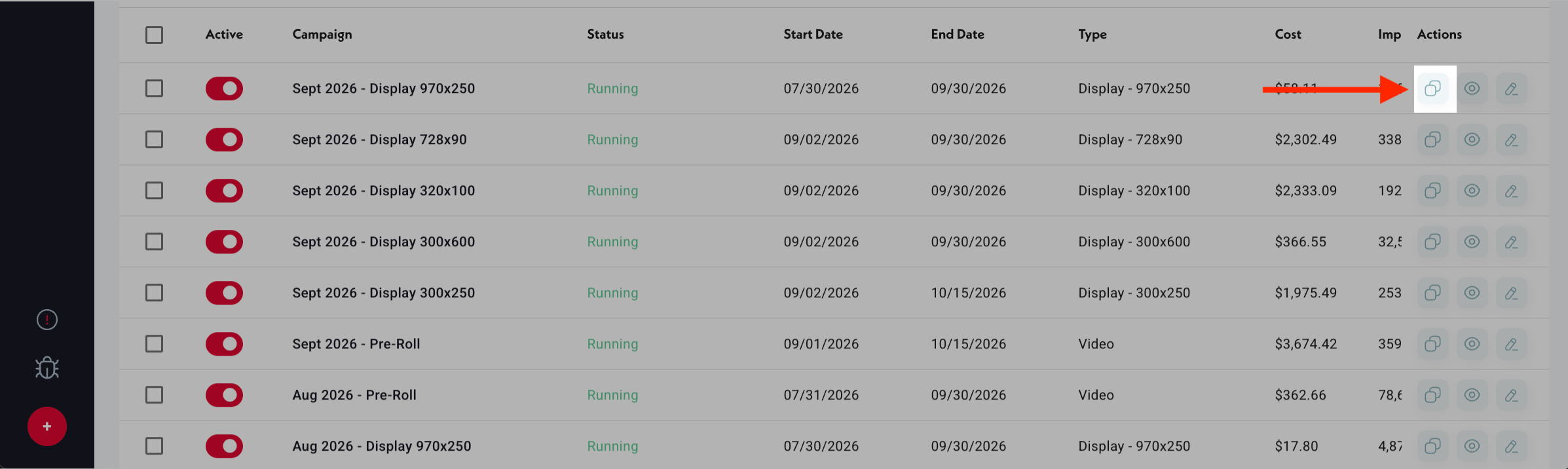
- 1Find the campaign in your Campaign Chart.
- 2Click the copy icon in the campaign row's action menu.
- 3Topple creates a duplicate of the campaign in draft state.
- 4Open the copy to edit: rename it, adjust dates, change targeting or creative as needed.
- 5Save and launch when ready.
What Carries Over
All settings from the original campaign copy over to the new draft: targeting, creative, budget parameters, pacing, CPM, and optimization settings. The copy is in draft state and will not run until you explicitly launch it.
Common Mistakes
- 1Launching the copy without updating the dates — if the original campaign had a past end date, the copy inherits it and will immediately be Expired when launched. Always update the start and end dates before saving the copy.
- 2Not renaming the copy — two campaigns with identical names make Campaign Chart reporting confusing. Give the copy a distinct name before launching.
- 3Assuming the copy resets spend — the copy starts with zero spend history, but its Total Budget is carried over from the original. If the original had a small Total Budget, the copy will hit that cap quickly.
Was this helpful?